As part of our platform consolidation, this content will be moving to Unity.com by March 31st, 2025.
Preview the new location and updated resources here.
在所有版本控制系統中,我們經常需要取得使用情況、哪些檔案正在變更,以及搜尋特定變更或特定分支的相關資訊。
達成此目的的最佳方式就是使用查詢。因此,當我們建立 Plastic SCM 時,會新增非常強大的查詢系統 (名為 cm find),它是可讓您取得包含變更集、分支、標籤、合併和程式碼檢閱之特定資訊的命令。
find 命令也能用來自訂 GUI 中的檢視。
本文涵蓋一些可使用 cm find 命令處理的範例案例。它們是一個有關您可在 Plastic SCM 安裝中進行之作業小的子集。每個範例都包含問題、逐步解決方案及預期輸出,協助您瞭解系統會回傳哪種資訊。
注意
您可以使用單數和複數來尋找物件。例如,您可以使用 cm find branch 或 cm find branches。
注意
所有 cm find 查詢都會區分大小寫。
注意
當您從命令列使用比較運算子 (>、<、>=、<=) 執行查詢時,請記住,此命令介面會將這些運算子視為 IO 重新導向。
因此,您將需使用引號括住查詢:
PowerShell 的相關注意事項
PowerShell 主控台將依預設逸出「雙」引號 (但不是「簡單」),因此我們必須額外放一組引號來指定將它們放在在命令之內:
cm find replicationlog where branch = "'/semanticmain'" --format="{date}" --nototal | select -Last 1或者,您也可以括住所有查詢:
cm find replicationlog "where branch = '/semanticmain'" --format="{date}" --nototal | select -Last 1我們可以擷取使用者在某個時間範圍內建立的分支,然後可以依特定屬性進行篩選。
我們開始擷取所有可用的分支:
cm find branches 301186 09/01/2013 8:18:51 /main/Fix-4.1/SCM12154 borja codice T 378467 12/02/2013 12:43:24 /main/scm12336 violeta codice T 379892 12/02/2013 17:52:14 /main/scm12336/scm12013 pablo codice T 407817 22/04/2013 16:32:31 /main/scm12636/scm12666 pablo codice T 426648 29/05/2013 17:36:04 /main/scm12313 pablo codice T Total: 5我們只要我們的分支,因此依使用者篩選:
cm find branches "where owner='pablo'" 379892 12/02/2013 17:52:14 /main/scm12336/scm12013 pablo codice T 407817 22/04/2013 16:32:31 /main/scm12636/scm12666 pablo codice T 426648 29/05/2013 17:36:04 /main/scm12313 pablo codice T Total: 3依使用者進行篩選後,我們現在只想要與此衝刺相關的分支,因此我們要尋找在特定日期之後建立的分支:
cm find branches "where owner='pablo' and date >= '2013/03/01'" 407817 22/04/2013 16:32:31 /main/scm12636/scm12666 pablo codice T 426648 29/05/2013 17:36:04 /main/scm12313 pablo codice T Total: 2您可以使用已設定格式的輸出:
cm find branches "where owner='pablo' and date >= '2013/03/01'" --format="{name,-30} {date}" /main/scm12636/scm12666 22/04/2013 16:32:31 /main/scm12313 29/05/2013 17:36:04 Total: 2最後,我們會尋找某個特定屬性。根據我們內部的功能生命週期,每個分支都必須先通過測試,才能在 main 分支上進行整合。
當分支通過測試時,「test」屬性將設為「passed」,因此我們會依屬性名稱和屬性值進行篩選:
cm find branches "where owner='pablo' and date >= '2012/01/01' and attribute ='test' and attrvalue = 'passed'" 426648 29/05/2013 17:36:04 /main/scm12313 pablo codice T Total: 1下表顯示目前可與 cm find branch 命令搭配使用的不同篩選選項:
| 篩選選項 ( where...) | |||||
|---|---|---|---|---|---|
| attribute | attrvalue | changesets | comment | date | guid |
| id | item | name | owner | parent | repllogid |
| replsrcdate | replsrcid | replsrcrepository | replsrcserver | ||
* 條件 date 對應至 [分支] 檢視中的 [建立日期] 欄。
瞭解如何使用常數依日期篩選。
此另一表格顯示目前可與 cm find branch 命令搭配使用的不同輸出選項:
| 輸出選項 ( --format...) | |||||
|---|---|---|---|---|---|
| comment | date | id | name | owner | parent |
我們可以找出變更集的許多資訊,而註解只是其中一項。如需快速資訊,我們可以使用 cm log 並執行自己的篩選 (使用 Shell 命令),或讓 cm find 為您完成此工作。
在此範例中,我們要取得屬於某個分支之所有變更集的日期和註解:
cm find changeset "where branch = 'main/scm12800'" --format="{date} - {comment}" 27/05/2013 13:25:53 - Updated output. 27/05/2013 13:26:45 - Changed SccPlugin with the new change. 27/05/2013 13:35:15 - Added solution. Total: 3這裡有所有的變更集,現在我們要尋找「解決方案」這個詞,我們可以在這裡輕鬆看到這個詞,但當有幾百個變更集時,就會變成緩慢且枯燥乏味的作業。為了依特定字詞進行篩選,我們使用 SQL 語法 LIKE 和 % 來進行概略搜尋,因為我們並不是要尋找完整註解:
cm find changeset "where branch = 'main/scm12800' and comment like '%solution%'" --format="{date} - {comment}" 27/05/2013 13:35:15 - Added solution. Total: 1我們也可以使用下列命令,依複寫日期查詢變更集 (我們稍後將瞭解如何取得最後複寫日期):
cm find changeset "where branch='semanticmain' and replsrcdate > '2013/06/17'" --nototal 427425 16794 /semanticmain 07/06/2013 11:06:38 violeta codice IntegrateMiryamtask 12838 427435 16804 /semanticmain 07/06/2013 19:25:31 violeta codice Changeassemblyversion (0.9.28.0). 427436 16805 /semanticmain 07/06/2013 19:54:35 lrodriguez codice Updatemapallreturnparent 可讓我們取得特定變更集或修訂的上層。如此一來,如果想要知道此變更集之前發生的情況,只需直接詢問:
cm find changeset "where changesetid = 16583 and returnparent = 'true'" --nototal 423630 16582 /main/scm12800 27/05/2013 13:25:53 roberto codice Updated output.下表顯示目前可與 cm find changeset 命令搭配使用的不同篩選選項:
| 篩選選項 ( where...) | |||||
|---|---|---|---|---|---|
| attribute | attrvalue | branch | changesetid | comment | date |
| guid | id | owner | parent | repllogid | replsrcdate |
| replsrcid | replsrcrepository | replsrcserver | returnparent | ||
* 條件 changesetid、date 和 owner 分別對應至 [變更集] 檢視中的 [名稱]、[建立日期] 和 [建立者] 欄。
瞭解如何使用常數依日期篩選。
此另一表格顯示目前可與 cm find changeset 命令搭配使用的不同輸出選項:
| 輸出選項 (--format...) | |||||
|---|---|---|---|---|---|
| branch | changesetid | comment | date | guid | id |
| owner | parent | ||||
只要有了分支,我們就可以取得自開始計算時間以來的所有複寫作業 (依時間先後順序排列)。
cm find replicationlog "where branch = '/semanticmain'" --nototal 424089 03/06/2013 12:16:42 codice@diana:9095 F pablo 426718 17/06/2013 18:46:38 codice@diana:9095 F pablo 427606 17/06/2013 18:50:47 codice@diana:9095 F pablo如果我們只需要最後的日期,我們可以依日期篩選搜尋,並使用 PowerShell 或 Bash 選取最後一列。
PowerShell:
cm find replicationlog "where branch = '/semanticmain'" --format="{date}" --nototal | select -Last 1Bash:
cm find replicationlog "where branch = '/semanticmain'" --format="{date}" --nototal | tail -n 1結果:
17/06/2013 18:50:47下表顯示目前可與 cm find replicationlog 命令搭配使用的不同篩選選項:
| 篩選選項 ( where...) | |||||
|---|---|---|---|---|---|
| branch | date | id | owner | package | repositoryname |
| server | |||||
瞭解如何使用常數依日期篩選。
此另一表格顯示目前可與 cm find replicationlog 命令搭配使用的不同輸出選項:
| 輸出選項 (--format...) | |||||
|---|---|---|---|---|---|
| date | id | owner | package | server | |
我們可以取得所有標籤:
cm find label --format="{name} {owner} {branch} {branchid}" --nototal on repository 'codice' BL234 lrodriguez /main 3 BL235 lrodriguez /main 3 BL236 lrodriguez /main/task001 4 BL237 lrodriguez /main 3 BL238 lrodriguez /main/task002 5 BL239 lrodriguez /main 3我們可以取得在特定分支中建立的所有標籤:
cm find label "where branch = '/main'" --format="{name} {owner}" --nototal on repository 'codice' BL234 lrodriguez BL235 lrodriguez BL237 lrodriguez BL239 lrodriguez在 codice,我們會為開發保留一個主要分支以及一個支援目前版本和舊版的「修正」分支,因此我們可能會想要尋找哪個分支包含某個特定發行版本:
cm find label "where name = 'BL237' on repository 'codice'" --nototal 191871 17/11/2011 16:38:06 BL237 10503 /main lrodriguez codice如畫面上所示,標籤 BL237 是來自 main 分支。
我們可以取得標籤日期,之後再要求在該分支的該時間範圍內所建立的變更集。取得兩個 (或更多) 標籤資訊的方法非常簡單:
cm find label "where name = 'BL237' or name='BL235' on repository 'codice'" --nototal 191869 11/11/2011 14:20:02 BL235 1750 /main lrodriguez codice 191871 17/11/2011 16:38:06 BL237 10503 /main lrodriguez codice下表顯示目前可與 cm find label 命令搭配使用的不同篩選選項:
| 篩選選項 ( where...) | |||||
|---|---|---|---|---|---|
| attribute | attrvalue | branch | branchid | changeset | comment |
| date | guid | id | name | owner | repllogid |
| replsrcdate | replsrcid | replsrcrepository | replsrcserver | ||
* 條件 date 對應至 [標籤] 檢視中的 [建立日期] 欄。
瞭解如何使用常數依日期篩選。
此另一表格顯示目前可與 cm find label 命令搭配使用的不同輸出選項:
| 輸出選項 ( --format...) | |||||
|---|---|---|---|---|---|
| branch | branchid | changeset | comment | date | id |
| name | owner | ||||
屬性可以套用至分支、變更集和標籤,沒有任何區別。首先,我們需要物件 ID。我們可以在查詢分支時讓它指定 ID:
cm find branch "where name = 'main'" --format="{id}" --nototal 3擁有該 ID 後,我們就可以使用下列命令取得屬性清單:
cm find attributes "where srcobj = 3" --nototal objid:3@repid:2@repserver:localhost:8087 -- status --> PASSED在此案例中,屬性名稱為 "status",而屬性值為 "Passed"。
我們可以使用一些 PowerShell 指令碼合併這兩個命令:
cm find branch "where name = 'main'" --format="{id}" --nototal |Foreach-Object { cm find attributes where srcobj= $_ --nototal}或使用 Bash 指令碼:
for branch_id in 'cm find branch "where name = 'main'" --format="{id}" --nototal' ;do cm find attributes "where srcobj=$branch_id" --nototal; done輸出會和之前一樣:
objid:3@repid:2@repserver:localhost:8087 -- status --> PASSED您將會透過執行下列查詢來取得相同輸出:
cm find attributes "where srcobj='br:/main'" --nototal假設我們為某些物件設定特定屬性 (在我們的案例中便是測試「狀態」)。無論將其包含在內的是什麼物件,我們都可以查詢這些屬性。
cm find attributes "where type = 'status' and value='PASSED' and date > 'this month'" objid:253012@repid:2@repserver:localhost:8087 -- status --> PASSED objid:253013@repid:2@repserver:localhost:8087 -- status --> PASSED objid:253014@repid:2@repserver:localhost:8087 -- status --> PASSED objid:268518@repid:2@repserver:localhost:8087 -- status --> PASSED下表顯示目前可與 cm find attributes 命令搭配使用的不同篩選選項:
| 篩選選項 ( where...) | |||||
|---|---|---|---|---|---|
| comment | date | guid | id | owner | srcobj |
| type | value | ||||
* 條件 date 和 type 分別對應至 [屬性] 檢視中的 [建立日期] 和 [名稱] 欄。
瞭解如何使用常數依日期篩選。
此另一表格顯示目前可與 cm find attributes 命令搭配使用的不同輸出選項:
| 輸出選項 ( --format...) | |||||
|---|---|---|---|---|---|
| comment | date | id | owner | type | value |
在先前的範例中擷取特定變更集後,我們現在可能會想要深入瞭解有哪些檔案有包含變更,為此可使用 find revision。
我們可指定自訂格式,因為我們只需要檔案和資料夾路徑:
cm find revisions "where changeset=16716" --format="{path}" d:\linked_replicated\ d:\linked_replicated\01nerva d:\linked_replicated\01nerva\src d:\linked_replicated\01nerva\src\client d:\linked_replicated\01nerva\src\client\plastic d:\linked_replicated\01nerva\src\client\plastic\libplasticTranslations.es.resx d:\linked_replicated\01nerva\src\client\plastic\libplasticTranslations.resx d:\linked_replicated\01nerva\src\client\plastic\ActionMenuManager.cs Total: 8透過一些命令列說明 (Linux 上的 grep 以及 Windows Powershell 上的 where),我們也可以依資料夾進行篩選:
PowerShell:
cm find revisions "where changeset=16716" --format="{path}" --nototal | where {$_ -match "client\\"}Bash:
bcm find revisions "where changeset=15430" --format="{path}" --nototal | grep client\/然後,輸出內容如下所示:
d:\linked_replicated\01nerva\src\client\plastic d:\linked_replicated\01nerva\src\client\plastic\libplasticTranslations.es.resx d:\linked_replicated\01nerva\src\client\plastic\libplasticTranslations.resx d:\linked_replicated\01nerva\src\client\plastic\ActionMenuManager.cs我們也可以在其所有變更集中進行搜尋,以取得分支的修訂資訊。首先,我們可以從分支和時間範圍取得所有已變更的項目:
cm find revisions "where branch = 'main/Fix-4.1/scm12814' and date <= '2013/05/30' and date > '2013/05/28'" --format="{date} - {path}"之後,我們可以使用最愛的 Shell 工具 (在我們的案例為 PowerShell) 篩選該資訊。
cm find revisions "where branch = 'main/Fix-4.1/scm12814' and date <= '2013/05/30' and date > '2013/05/28'" --format="{date} - {path}" | where {$_ -match "view\\"}如果您偏好使用 Bash,請使用下列命令列:
cm find revisions "where branch = 'main/Fix-4.1/scm12814' and date <= '2013/05/30' and date > '2013/05/28'" --format="{date} - {path}" | grep view\/預期的輸出如下所示:
28/05/2013 12:35:18 - d:\linked_replicated\01nerva\src\client\plastic\view\releasediagram 28/05/2013 12:35:18 - d:\linked_replicated\01nerva\src\client\plastic\view\releasediagram\drawingStyles 28/05/2013 12:35:18 - d:\linked_replicated\01nerva\src\client\plastic\view\releasediagram\drawingStyles\BaseDrawingStyle.cs下表顯示目前可與 cm find revisions 命令搭配使用的不同篩選選項:
| 篩選選項 ( where...) | |||||
|---|---|---|---|---|---|
| archived | attribute | attrvalue | branch | changeset | date |
| guid | id | item | itemid | label | marker |
| owner | parent | repllogid | replsrcdate | replsrcid | replsrcrepository |
| replsrcserver | returnparent | size | type | workspacecheckoutid | |
瞭解如何使用常數依日期篩選。
此另一表格顯示目前可與 cm find revisions 命令搭配使用的不同輸出選項:
| 輸出選項 ( --format...) | |||||
|---|---|---|---|---|---|
| branch | changeset | date | id | item | itemid |
| owner | parent | size | type | ||
可以合併資訊嗎?您可以追蹤來自特定來源/目的地分支或變更集的已完成合併。
若要知道分支已在哪個位置整合,您可以輸入下列命令:
cm find merge "where srcbranch ='main/Fix-4.1/SCM11769'" br:/main/Fix-4.1/SCM11769@55613 -->br:/main/Fix-4.1/Release-4.1.10.447@55808 Total: 1若要瞭解已在特定分支中整合哪些分支,請使用下列命令:
$ cm find merge "where dstbranch ='main/Fix-4.1/Release-4.1.10.447'" br:/main/Fix-4.1/SCM12835@55568 -->br:/main/Fix-4.1/Release-4.1.10.447@55801 br:/main/Fix-4.1/scm11898@55647 -->br:/main/Fix-4.1/Release-4.1.10.447@55802 br:/main/Fix-4.1/scm12839@55678 -->br:/main/Fix-4.1/Release-4.1.10.447@55803 br:/main/Fix-4.1/SCM11769@55613 -->br:/main/Fix-4.1/Release-4.1.10.447@55808 br:/main/Fix-4.1/SCM12860@55735 -->br:/main/Fix-4.1/Release-4.1.10.447@55809 Total: 5先前命令也能使用格式標誌來自訂輸出 (方法是只傳回分支名稱),如此一來,第二個命令就會變成:
$ cm find merge "where dstbranch ='main/Fix-4.1/Release-4.1.10.447'" --format="{srcbranch}" --nototal br:/main/Fix-4.1/SCM12835 br:/main/Fix-4.1/scm11898 br:/main/Fix-4.1/scm12839 br:/main/scm12419 br:/main/SCM4052 br:/main/Fix-4.1/SCM11769 br:/main/Fix-4.1/SCM12860或者:
cm find merges "where dstbranch='br:/main/ReleaseBL274'" --format="{srcbranch}@{srcchangeset} --> {dstbranch}@{dstchangeset}({type})" --nototal br:/main/scm11148@43953 --> br:/main/ReleaseBL274@44094 (merge) br:/main/scm11181@43969 --> br:/main/ReleaseBL274@44096 (merge) br:/main/Fix-4.0/SCM11101@44010 --> br:/main/ReleaseBL274@44030 (merge) br:/main/scm11135@43980 --> br:/main/ReleaseBL274@44031 (merge) br:/main/ReleaseBL272@43914 --> br:/main/ReleaseBL274@44032 (cherrypick) br:/main/ReleaseBL268@43663 --> br:/main/ReleaseBL274@44033 (cherrypick) br:/main/scm10957@43952 --> br:/main/ReleaseBL274@44093 (merge) br:/main/SCM11195@43981 --> br:/main/ReleaseBL274@44095 (merge) br:/main/SCM10924@43942 --> br:/main/ReleaseBL274@44033 (merge)切記,find merge 會傳回所有類型的合併:一般合併、精挑細選合併與減性合併。
因此,您可以間隔合併至指定的分支:
cm find merges "where dstbranch='br:/main/Fix-4.1/ReleaseBL285' and type='intervalcherrypick'" --format="({basebranch}@{basechangeset}, {srcbranch}@{srcchangeset}] --> {dstbranch}@{dstchangeset}" --nototal (br:/main@44448, br:/main/scm11318@44461] --> br:/main/Fix-4.1/ReleaseBL285@44463我們可以透過兩個查詢 (find branches、find merge) 和一些 PowerShell 駭客攻擊來取得此問題的解答。將此程式碼放置在 PS1 檔案上,並從 PowerShell 主控台執行:
$allBranches = cm find branches "where date >= '2013/06/20'" --format="{name}" --nototal; $allMerged = cm find merge "where date >= '2013/06/20'" --format="{srcbranch}" --nototal; for($i = 0; $i -le $allBranches.length -1; $i++) {$allBranches[$i] = 'br:' + $allBranches[$i]} $allBranches| ?{$allMerged -notcontains $_}以下是範例輸出:
br:/main/scm12619 br:/main/Fix-4.1/scm12916 br:/main/Fix-4.1/scm12899/scm12947 br:/main/Fix-4.1/scm11180 br:/main/Fix-4.1/scm8782 br:/main/Fix-4.1/scm12944 br:/semanticmain/SCM12759/scm12948此程式碼會執行下列動作:
Bash Shell 中的等同程式碼如下所示:
$ allBranches='cm find branches "where date >= '2013/06/20'" --format="{name}" --nototal' $ allMerged='cm find merge "where date >= '2013/06/20'" --format="{srcbranch}" --nototal' $ for branch in $allBranches; do [ ! 'echo $allMerged | grep 'br:$branch'' ] && print "br:$branch"; done此程式碼會在它那一端執行下列動作:
我們正在尋找此案例:
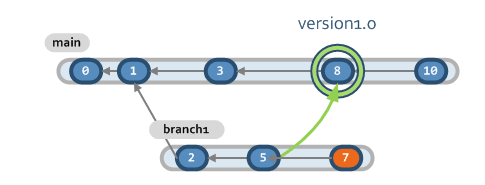
我們想要那些已整合至另一個分支的分支 (因此我們必須捨棄與同一分支的合併),但有待整合的變更集 (圖片上的橘色 cset),可以透過單一查詢來操作,然後透過一些 PowerShell 程式碼進行一些後製處理:
$allMergedNonFiltered = cm find merge "where date >= '2013/06/01'" --format="{srcbranch} {dstbranch} {srcchangeset}" --nototal; $allMerged = $allMergedNonFiltered | ForEach-Object {$res = $_.Split(" "); if($res[0] -ne $res[1]) {$res[0] + " " + $res[2]} }; $semiMerged = $allMerged | ForEach-Object {$_.Split(" ")[0] }; $allBranches = cm find branches where "date >= '2013/06/01'" --format="{name} {changeset}" --nototal; for($i = 0; $i -le $allBranches.length -1; $i++) {$allBranches[$i] = 'br:' + $allBranches[$i]} $allBranches| ?{$allMerged -notcontains $_ -and $semiMerged -contains $_.Split(" ")[0]}以下是範例輸出:
br:/main/Fix-4.1/scm12861 56049 br:/main/Fix-4.1/SCM12817 56300 br:/main/Fix-4.1/scm12899 56270此程式碼會執行下列動作:
如果您在使用 Bash,以下是替代方案:
$ cm find merge "where date >= '2013/06/01'" --format="{srcbranch}#{dstbranch}#{srcchangeset}" --nototal |awk -F "#" '{if($1 != $2) print $1 "#" $3}' | tee allMerges | cut -d'#' -f1 | sort -u > mergedBranches $ for branch in 'cm find branches where "date >= '2013/06/01'" --format="br:{name}#{changeset}" --nototal;'; do [ ! "'grep $branch allMerges'" ] && [ "'echo $branch | grep -f mergedBranches'" ] && echo $branch; done $ rm allMerges mergedBranches我們正在做的是:
我們正在尋找此案例:
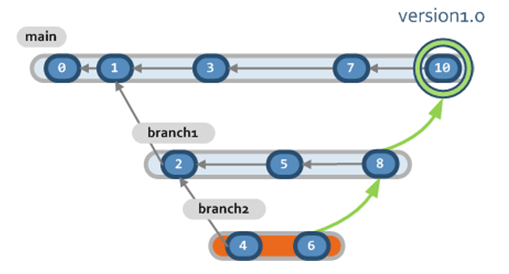
我們要知道哪些分支已整合至 1.0 版 (直接或間接)。和之前一樣,我們只需要對伺服器執行單一查詢,以及執行一些其他 PowerShell 命令來篩選資料。在此特定範例中,我們要取得已在 /main 中整合的所有分支。
function ListAll($list, $visited, $targetBranch, $depth) { $visited += $targetBranch; $list | ForEach-Object { $res = $_.Split(" "); if(($res[1] -eq $targetBranch) -and ($visited -notcontains $res[0])) { Write-Host $depth $res[0]; $visited += $res[0]; $temp_visited = ListAll $list $visited $res[0] ($depth + "-"); $temp_visited | ForEach-Object{ if($visited -notcontains $_) { $visited += $_; } } } } return $visited; } $targetBranch = "br:/main"; $allMergedNonFiltered = cm find merge "where date >= '2013/01/01'" --format="{srcbranch} {dstbranch}" --nototal; $allMerged = $allMergedNonFiltered | ForEach-Object {$res =$_.Split(" "); if($res[0] -ne $res[1]) {$res[0] + " " + $res[1]} } $visited = @(); $targetBranch ListAll $allMerged $visited $targetBranch "-" | Out-Null;以下為範例輸出,我們可以看到分支 12299 已在版本 4.3.39.406 中間接整合
br:/main br:/main/Release-4.2.29.406 br:/main/SCM12356 br:/main/scm12238 br:/main/Release-4.2.28.387/SCM12169/scm12230 br:/main/SCM12243/scm12280/scm12277/scm12293 br:/main/scm12238/scm12299指令碼簡述如下:
您可使用下列指令碼,完成 Bash 底下的同等項目:
cm find merge "where date >= '2013/01/01'" --format="{srcbranch}#{dstbranch}" --nototal | awk -F "#" '{if($1 != $2) print $1 "#" $2}' > list touch old_targets touch next_targets echo "br:/main" | tee targets depth=">" while [ -s targets ]; do for merge in 'grep -f targets list'; do src_branch=${merge%#*} was_already_target="'grep ${src_branch} old_targets 2>/dev/null'" already_on_next_targets="'grep ${src_branch} next_targets 2>/dev/null'" if [ ! "$was_already_target" ] && [ ! "$already_on_next_targets" ]; then echo ${src_branch} >> next_targets echo ${depth}${src_branch} fi done depth="-${depth}" cat targets >> old_targets [ -s next_targets ] && mv next_targets targets || rm -f targets done rm -f list old_targets此指令碼簡述如下:
下表顯示目前可與 cm find merge 命令搭配使用的不同篩選選項:
| 篩選選項 ( where...) | |||||
|---|---|---|---|---|---|
| date | dstbranch | dstchangeset | guid | id | owner |
| srcbranch | srcchangeset | type | |||
瞭解如何使用常數依日期篩選。
此另一表格顯示目前可與 cm find merge 命令搭配使用的不同輸出選項:
| 輸出選項 ( --format...) | |||||
|---|---|---|---|---|---|
| date | dstbranch | dstchangeset | id | owner | srcbranch |
| srcchangeset | type | ||||
整合式程式碼檢閱功能可讓我們取得有關檢閱狀態的資訊。在此範例中,我們開始取得我的檢閱 (亦即指派給「我」的檢閱,其中 'me' 是目前使用者)。我們也可以像之前一樣輸入使用者名稱。
cm find reviews "where assignee = 'me'" 399982 08/03/2013 10:43:30 danipen Status1 pablo "scm12563" Branch id:399570 419067 20/05/2013 9:59:49 asalim Status0 pablo "scm12411" Branch id:416824 8424078 29/05/2013 14:50:35 borja Status1 pablo "Review scm12816" Branch id:424073 425830 05/06/2013 17:04:37 jesusmg Status0 pablo "Review scm11179" Branch id:413120 426717 14/06/2013 14:01:14 roberto Status1 pablo "Code review 1" Branch id:426648 Total: 5之後,我們可以將結果的範圍設定為具有特定狀態 (1 = 已核准) 的檢閱:
cm find reviews "where assignee = 'me' and status = 1" 399982 08/03/2013 10:43:30 danipen Status1 pablo "scm12563" Branch id:399570 8424078 29/05/2013 14:50:35 borja Status1 pablo "Review scm12816" Branch id:424073 426717 14/06/2013 14:01:14 roberto Status1 pablo "Code review 1" Branch id:426648 Total: 3最後,我們會取得在特定時間範圍內完成的檢閱:
cm find "review where assignee = 'me' and date > '2013/05/01' and date < '2013/06/29'" 419067 20/05/2013 9:59:49 asalim Status0 pablo "scm12411" Branch id:416824 8424078 29/05/2013 14:50:35 borja Status1 pablo "Review scm12816" Branch id:424073 425830 05/06/2013 17:04:37 jesusmg Status0 pablo "Review scm11179" Branch id:413120 426717 14/06/2013 14:01:14 roberto Status1 pablo "Code review 1" Branch id:426648 Total: 4因此,我們要將它與具有此特定範圍和此特定條件的檢閱進行比較:
cm find "review where assignee = 'me' and date > '2013/06/14' and date < '2013/06/15' and status = 1" 8424078 29/05/2013 14:50:35 borja Status1 pablo "Review scm12816" Branch id:424073 426717 14/06/2013 14:01:14 roberto Status1 pablo "Code review 1" Branch id: 426648 Total: 2透過這兩個查詢,我們可以取得此衝刺上已核准/所有檢閱的比率。
下表顯示目前可與 cm find review 命令搭配使用的不同篩選選項:
| 篩選選項 ( where...) | |||||
|---|---|---|---|---|---|
| assignee | comment | date | guid | id | owner |
| status | targetid | ||||
* 條件 date 和 targetid 分別對應至 [程式碼檢閱] 檢視中的 [建立日期] 和 [已檢閱物件] 欄。
瞭解如何使用常數依日期篩選。
此另一表格顯示目前可與 cm find review 命令搭配使用的不同輸出選項:
| 輸出選項 ( --format...) | |||||
|---|---|---|---|---|---|
| assignee | date | id | owner | status | target |
| targettype | title | ||||
我們可以取得我的團隊成員在去年期間建立的擱置:
cm find shelve "where owner != 'me' and date >= '1 years ago'" 3848 2 04/10/2018 5:58:22 PM pablo doom3code Shelve - temporary compilation.txt file 3860 3 06/23/2018 11:08:06 PM pablo doom3code Shelve - test with a new configuration Total: 2下表顯示目前可與 cm find shelve 命令搭配使用的不同篩選選項:
| 篩選選項 ( where...) | |||||
|---|---|---|---|---|---|
| owner | date | attribute | attrvalue | comment | guid |
| parent | shelveid | id | |||
瞭解如何使用常數依日期篩選。
此另一表格顯示目前可與 cm find shelve 命令搭配使用的不同輸出選項:
| 輸出選項 (--format...) | |||||
|---|---|---|---|---|---|
| id | shelveid | date | owner | repository | comment |
在本文中,我們已瞭解如何自訂輸出,但我們也可以將輸出設定為 XML,並將其儲存至檔案以便後續分析。如此一來,命令如下所示:
cm find revisions "where changeset=16716" --xml --file=output.xml會產生下列 XML 內容:
<?xml version="1.0" encoding="utf-8" ?>
<PLASTICQUERY>
  <REVISION>
    <ID>426098</ID>
    <COMMENT></COMMENT>
    <DATE>07/06/2013 16:00:09</DATE>
    <OWNER>roberto</OWNER>
    <TYPE>dir</TYPE>
    <SIZE>0</SIZE>
    <CHANGESET>16716</CHANGESET>
    <PARENT>426069</PARENT>
    <ITEM>d:\linked_replicated\</ITEM>
    <ITEMID>2</ITEMID>
    <BRANCH>br:/main/Fix-4.1/scm12863</BRANCH>
    <PATH>d:\linked_replicated\</PATH>
    <REPOSITORY>codice</REPOSITORY>
    <REPNAME>codice</REPNAME>
    <REPSERVER>localhost:8087</REPSERVER>
    <HASH>kWJO1fm+7RCiZZcgSjM4/Q==</HASH>
  </REVISION>
  <REVISION>
    <ID>426092</ID>
    <COMMENT></COMMENT>
    <DATE>07/06/2013 16:00:09</DATE>
    <OWNER>roberto</OWNER>
    <TYPE>txt</TYPE>
    <SIZE>78238</SIZE>
    <CHANGESET>16716</CHANGESET>
    <PARENT>426056</PARENT>
    <ITEM>d:\linked_replicated\01nerva\src\client\plastic\ActionMenuManager.cs</ITEM>
    <ITEMID>37736</ITEMID>
    <BRANCH>br:/main/Fix-4.1/scm12863</BRANCH>
    <PATH>d:\linked_replicated\01nerva\src\client\plastic\ActionMenuManager.cs</PATH>
    <REPOSITORY>codice</REPOSITORY>
    <REPNAME>codice</REPNAME>
    <REPSERVER>localhost:8087</REPSERVER>
    <HASH>FXmLNV7B9Et1wTGqULWpgQ==</HASH>
  </REVISION>
</PLASTICQUERY>
此內容之後可匯入 Excel 等工具中,以便順利從中取得統計資料。
假設我們要取得儲存庫中所有變更集的資訊,我們可以執行下列命令:
cm find changeset --xml --file=output.xml接著,我們可以在 Excel 中載入輸出;結果如下:
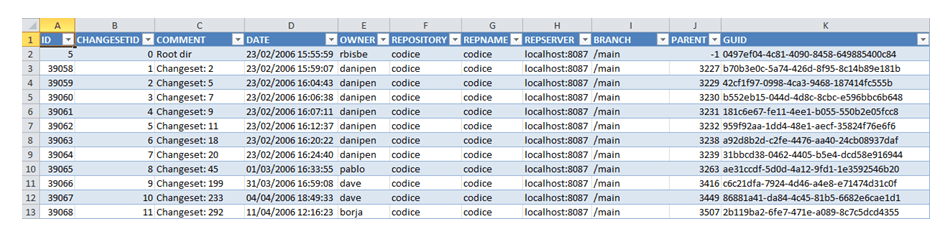
Excel 包含樞紐分析表,這是一個非常實用的公用程式,可讓我們取得更多統計資料。
我們可以使用 Excel 提供的篩選和排序功能,將變更集使用者分組,並將這些統計資料轉換為圖形:
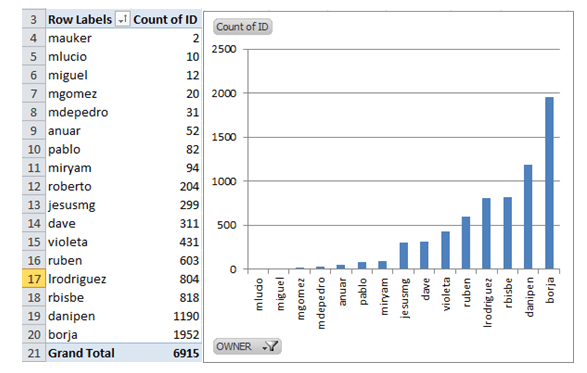
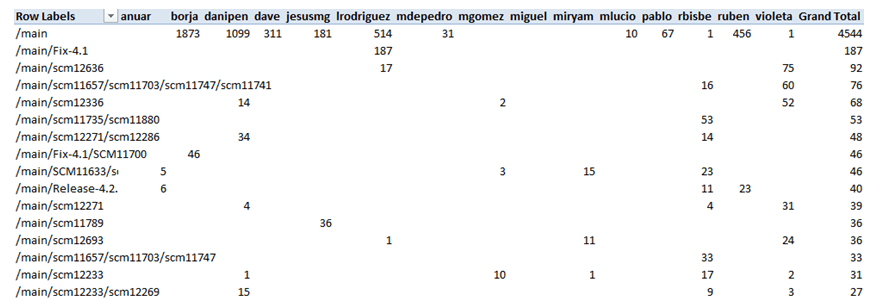
我們也可以依分支分組,而且可以在依分支分組的狀態下瞭解有多少名使用者已貢獻內容,以及每個使用者已在每個分支上建立多少個變更集。
find 命令具有適用於每個物件的預設輸出,但我們可以像之前看到的一樣,定義自訂輸出選項、使用 XML 格式搭配 --xml 屬性擷取結果,以及使用 --file 屬性將結果儲存在檔案中,以便進行後續分析。
一般語法如下:
cm find object "[where conditions] [on repositories]" [options]其中:
只要我們擁有可查詢該儲存庫的授權,這就能運作。
您不僅可以從不同的儲存庫,也可以從不同的伺服器一起執行查詢。例如
cm find "changesets where date >= '2017/11/17' on repositories 'documentation/plasticdocu@localhost:8087','codice@codice@cloud'" --nototal 68621 1451 /main/scm21135 11/20/2017 3:32:31 PM maria documentation/plasticdocu Added documentation about the EOL conversion mechanism. 4821759 132324 /main/SCM21120 11/20/2017 1:41:45 PM pablo codice Added missing config file 4821840 132326 /main/scm21149/scm21150 11/20/2017 1:54:35 PM vsanchezm@codicesoftware.com codice Fix HAL FAILED - Conflicts and user intervention required. Rebase from main. 4821941 132333 /main 11/20/2017 2:38:28 PM hal codice HAL: merged /main/scm21076/scm21084/scm21093 : GTK Gluon: add pending changes view依日期篩選時,您可以使用遵循您機器當地語系化設定的日期格式。例如,若您的電腦顯示「MM-dd-yyyy」格式的日期,則您可以在查詢中使用如「12-31-2019」之類的日期。
您也可以使用下列常數簡化查詢:
'today':今天的日期。yesterday':昨天的日期。this week':本週星期一的日期。this month':本月第 1 天的日期。this year':今年 1 月 1 日的日期。one day ago':目前日期的前一天。one week ago':目前日期的前七天。one month ago':目前日期的前一個月。n days ago':目前日期的前「n」天。n months ago':目前日期的前「n」個月。n years ago':目前日期的前「n」年。下列 where 子句適用於欄位類型 date: